
Recently, I’ve been doing some vector and animations, It’s for my new android app for the stock market. Every time I open Inkscape1, it always greeted me with the default template. The next thing I do is change the document properties to the way I want, and it became a chore.

Every child is an artist. The problem is how to remain an artist once we grow up.
— Pablo Picasso.
So, I searched the internet on how to basically set the default template to my liking.
Steps to change the default template
- Create a new document and set its document properties which can be found on
File > Document Properties. - It will show a simple dialog which is this.
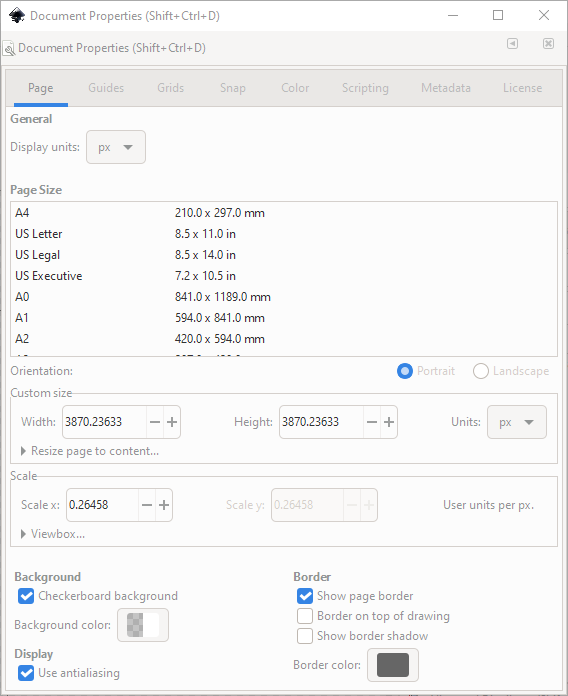
- In the dialog do what you like. Modify it based on what you want to see everytime you open Inkscape.
- After that, do a
File > Save As...and save it to your local user inkscape directory which will be inC:\Users\<your-user>\AppData\Roaming\Inkscape\template
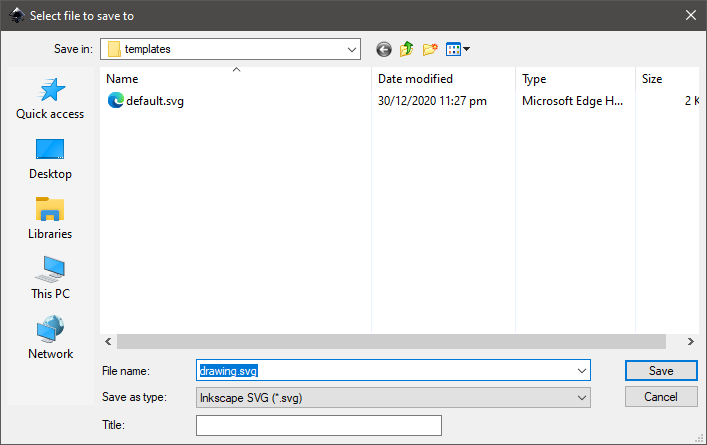
- Save it as
default.svg. Then restart Inkscape for changes to take effect.
Enjoy that’s all. 🍂
- Inkscape is a free and open-source vector graphics editor used to create vector images, primarily in Scalable Vector Graphics (SVG) format. Other formats can be imported and exported. ↩︎
[ SIGNATURE VERIFIED // GPG 0x4EB27DB0 // PROVENANCE SECURE ]
➔ RETURN TO LOGS